The classic Tetris game ported to the Godot game engine
Tetris is a game where blocks fall from the top. your job is to move and drop the blocks, so they form an unbroken line, left to right. Once you have a unbroken line, the line disappears and you will be rewarded with points.
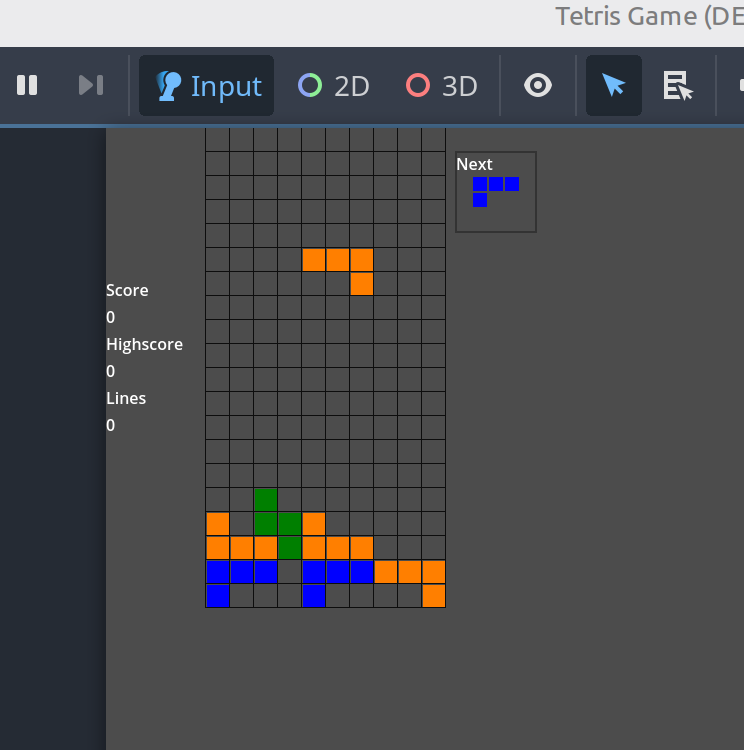
This is what the game will look like in the end.
Open Godot. Click ‘Create’ in the top-left corner. Name your project – ‘Tetris Game’. Select your project path. Then click …
Create a new Node2D scene. Rename the Node2D to ‘Main’. Now add a Node2D node to ‘Main’. Rename the new …
Create a new Node2D scene. Rename the Node2D to ‘Board’. Save the scene as ‘board.tscn’ Attach a script to the …
Create a new scene of type ‘Control’. Rename the ‘Control’ node to ‘HUDLeft’. Add a ‘VBoxContainer’ to ‘HUDLeft’. Now add …
Create a new scene with type ‘Control’. Rename the ‘Control’ to ‘HUDRight’. Add a ‘VBoxContainer’ to ‘HUDRight’. Now add the …
Create a new scene of type ‘Control’. Rename the ‘Control’ node to ‘GameOver’. Save the scene as ‘game_over.tscn’. Set Layout …
Open the ‘board.gd’ script. We start by adding constants right after the ‘extends Node2D’ line. extends Node2D const BOARD_WIDTH := …
Open the ‘main.gd’ script. We start by adding constants right after the ‘extends Node2D’ line. And then we add the …
Open the ‘next_preview.gd’ script. We start by adding constants right after the ‘extends Node2D’ line. And then we add the …
Open the ‘game_over.tscn’ scene. Select the ‘GameOver’ node. Attach a script. extends Control @export var final_score: int = 0 @export …
Before we do a test run, we have to set the ‘Main Scene’ in ‘Project Settings’. Now that we have …
Here we have a few ideas/examples of expanding and tweaking our Tetris game. Game Over tweak …
We will be updating our GameOver routine as follows. Blur background (GameRoot) Show GameOver in 2x size Let’s begin with …
