Create a new scene of type ‘Control‘.
Rename the ‘Control‘ node to ‘GameOver‘.
Save the scene as ‘game_over.tscn‘.
Set Layout to ‘Full Rect‘.
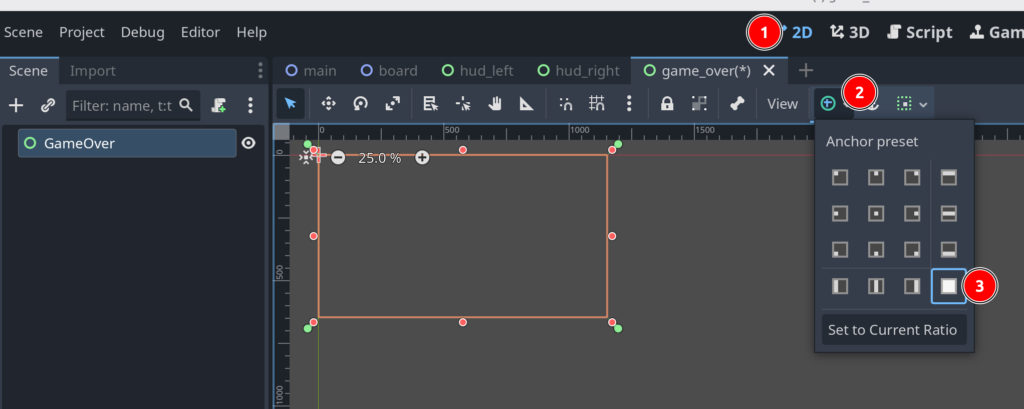
Add a Control -> CenterContainer node to ‘GameOver‘.
Select the ‘CenterContainer‘. Set Layout to ‘Full Rect‘.
Add a Control -> Panel node to ‘CenterContainer‘.
Select the ‘Panel‘ node. Set Layout to ‘Full Rect‘.
Add a Controls -> Container -> BoxContainer -> ‘VBoxContainer‘.
Add the following child nodes to the ‘VBoxContainer‘ node.
- Control -> Label
- Rename to ‘LabelTitle‘
- Set ‘Text‘ property to ‘GAME OVER‘
- Control -> Label
- Rename to ‘LabelScore‘
- Control -> Label
- Rename to ‘LabelHighScore‘
- Controls -> Label
- Rename to ‘LabelLines‘
- Controls -> Container -> BoxContainer -> ‘HBoxContainer‘
We now add 2 buttons to the ‘HBoxContainer‘.
- Controls -> BaseButton -> ‘Button‘
- Rename to ‘ButtonAgain‘
- Set ‘Text‘ property to ‘Play Again‘
- Controls -> BaseButton -> ‘Button‘
- Rename to ‘ButtonQuit‘
- Set ‘Text‘ property to ‘Quit‘
You should now have a scene looking like this.

Save ‘game_over.tscn‘.
Now open ‘main.tscn‘.
Select ‘GameRoot‘ node.
Add a CanvasLayer node. Rename it to ‘UILayer‘.
Add a Control to ‘UILayer‘. Rename to ‘UIRoot‘.
Select ‘UIRoot‘ node. Set Layout to ‘Full Rect‘.
Your ‘main.tscn‘ should now look like this.
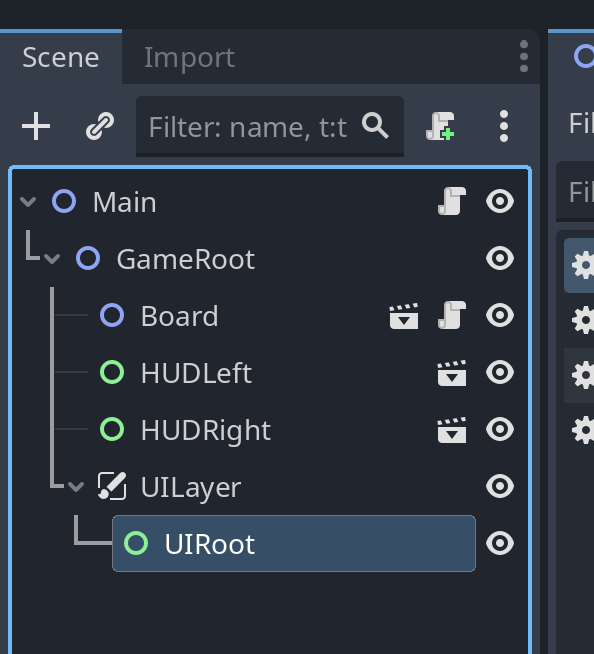
Save ‘main.tscn‘.

Leave a Reply